


SEO Keywords: Canva AI tools, AI design tools, design software review, content creator tools, Canva for bloggers, Canva Magic Studio review 2026


Canva Magic Studio Review: Is It Worth It for Content Creators in 2026?
If you create content for a living, chances are Canva has already been part of your workflow at some point. But Canva Magic Studio is more than another update. It is Canva’s attempt to build an AI-powered creative workspace that can help creators design faster, write captions, generate images, edit videos, and repurpose content without switching between multiple tools.
In 2026, content creators are under more pressure than ever. YouTube creators need thumbnails and scripts. Bloggers need featured images, Pinterest graphics, and social snippets. Small businesses need branded posts every day. The promise of Canva Magic Studio is simple: reduce the time spent on repetitive creative work.
But is it actually worth paying for? After spending time testing the platform, comparing it with alternatives, and looking at how creators are using it in real projects, the answer is mostly yes — but with a few important caveats.
This review covers what Canva Magic Studio includes, how well it performs, where it shines, where it struggles, and whether it deserves a place in your 2026 content creation toolkit.
What Is Canva Magic Studio?
Canva Magic Studio is Canva’s collection of AI-powered creative tools built into the main Canva platform. Instead of offering one separate AI app, Canva combines writing, image generation, design assistance, video editing, and brand consistency tools into a single workspace.
For content creators, this is important because most creative work is connected. A blog post often needs a featured image, social media graphics, a Pinterest pin, and a short caption. Magic Studio is designed to handle many of those tasks from one dashboard.
Key features included in Canva Magic Studio
- Magic Write for generating captions, blog outlines, scripts, summaries, and marketing copy
- Magic Design for creating layouts automatically from prompts or uploaded media
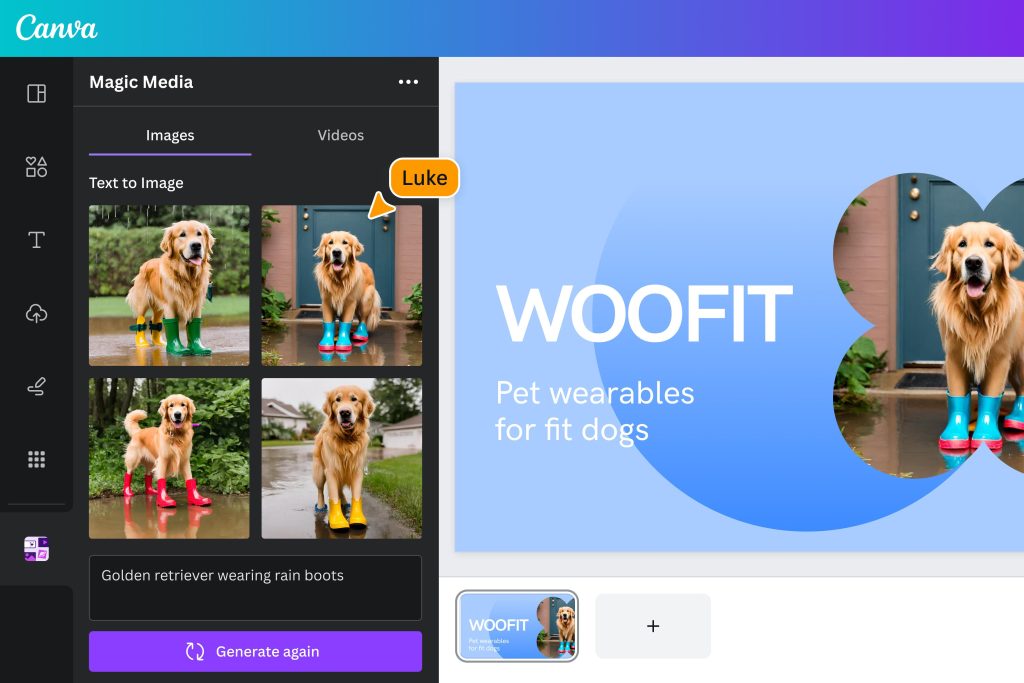
- Magic Media for AI image generation
- Magic Edit for editing specific parts of an image
- Magic Eraser for removing unwanted objects
- Magic Expand for resizing and extending images
- Magic Animate for turning static designs into motion graphics
- Brand Kit integration for keeping fonts, colors, and logos consistent
- AI presentation and video assistance for faster content production


First impressions after using Canva Magic Studio
The first thing that stands out is how accessible the platform feels. Unlike many AI tools that require separate accounts, complicated prompts, or technical setup, Canva keeps most of the AI features inside the editor you already know.
That matters because creators rarely want another tool to manage. If you are already using Canva for thumbnails, Instagram posts, presentations, or blog graphics, Magic Studio feels like a natural extension rather than a completely new platform.
The interface is clean, the AI suggestions appear where you need them, and most features can be used with simple plain-language prompts. For beginners, this is a major advantage. For experienced creators, it means less time spent learning and more time producing.
Magic Write: Useful, but not a complete writing replacement
Magic Write is Canva’s AI writing assistant. It can generate captions, blog outlines, product descriptions, email drafts, video scripts, and short-form marketing copy.
What it does well
- Creates social media captions quickly
- Generates blog outlines
- Helps overcome writer’s block
- Produces first drafts for emails and descriptions
- Summarizes long text into shorter formats
Where it falls short
Magic Write is helpful for speed, but it is not a substitute for original thinking. The generated text often needs editing to sound more personal, more specific, and more authoritative.
For bloggers, the best use case is drafting outlines, introductions, social snippets, and supporting copy — not publishing long articles without revision.
Compared with dedicated AI writing tools, Magic Write is convenient because it sits inside Canva, but it is still best treated as an assistant rather than a full writing replacement.
Magic Design: A real time saver
Magic Design is one of the strongest features in the suite. You can upload an image, enter a prompt, or provide brand assets, and Canva generates multiple design layouts automatically.


For example, if you upload a product photo, Canva can generate Instagram posts, Facebook ads, presentation slides, and Pinterest pins using that same image.
This is especially useful for
- Bloggers creating featured images
- YouTubers making thumbnails
- Social media managers producing daily posts
- Small business owners creating promotions
- Course creators building presentation slides
Instead of starting from a blank canvas, you start with several usable layouts. That alone can save a significant amount of time.
Magic Media: AI image generation
Magic Media allows users to generate images from text prompts directly inside Canva.


The quality is good for
- Blog illustrations
- Social media graphics
- Concept art
- Background images
- Presentation visuals
The quality is less reliable for
- Highly realistic human faces
- Detailed product mockups
- Complex scenes with many objects
- Professional commercial photography
For most everyday content creation, the results are good enough. The biggest advantage is convenience: you do not need to leave Canva, generate an image elsewhere, download it, and upload it again.
Magic Edit, Magic Eraser, and Magic Expand
These image editing tools are where Canva becomes surprisingly powerful for non-designers.


Magic Edit
Lets you select part of an image and replace it using AI instructions.
Magic Eraser
Removes unwanted objects from photos.
Magic Expand
Extends the edges of an image, which is especially useful when resizing graphics for different platforms.
For content creators, these tools can eliminate the need for quick Photoshop edits.
Real-world use cases for content creators
For bloggers
- Featured images
- Pinterest pins
- Social share graphics
- Quote cards
- Infographics
For YouTubers
- Thumbnails
- Channel banners
- Community post graphics
- Video intro slides
- Shorts covers
For social media creators
- Instagram posts
- Carousel graphics
- Facebook ads
- LinkedIn posts
- Stories and reels covers
For small businesses
- Promotional graphics
- Product announcements
- Email banners
- Presentation slides
- Brand templates
Pricing in 2026
Most of the advanced Magic Studio features are included with Canva Pro.
| Plan | Best for |
|---|---|
| Canva Free | Basic design needs |
| Canva Pro | Most content creators |
| Canva Teams | Collaborative teams |
For solo creators, Canva Pro is usually the sweet spot. The value depends on how often you create graphics, captions, thumbnails, presentations, and social posts.
Canva Magic Studio vs other tools
Canva vs Adobe Express
| Feature | Canva Magic Studio | Adobe Express |
|---|---|---|
| Ease of use | Excellent | Good |
| AI writing | Very good | Good |
| AI image generation | Very good | Very good |
| Templates | Excellent | Good |
| Collaboration | Excellent | Good |
| Learning curve | Low | Medium |
Canva wins for ease of use and template variety.
Canva vs Microsoft Designer
Microsoft Designer is improving quickly, but Canva still has a more mature ecosystem, more templates, and better collaboration features.
Canva vs dedicated AI tools
Dedicated AI tools may produce stronger writing or more advanced image generation, but Canva’s advantage is that everything is connected in one workflow.
Pros and cons
Pros
- Very beginner-friendly
- Saves time on repetitive design tasks
- Excellent template library
- Strong brand consistency tools
- AI writing and image generation in one place
- Great for social media content
- Useful for bloggers and YouTubers
Cons
- AI-generated text still needs editing
- Image generation is not always perfect
- Advanced designers may want more control
- Best features require Canva Pro
- Heavy users may still need specialized tools
Who should use Canva Magic Studio?
Best for
- Bloggers
- YouTubers
- Instagram creators
- Facebook marketers
- Pinterest creators
- Small business owners
- Course creators
- Freelancers
Probably not enough for
- Professional graphic designers who need advanced editing
- High-end photo retouchers
- Studios producing cinematic visual work
- Writers who need deeply researched long-form articles without editing
SEO and AdSense friendliness
From a publishing perspective, Canva Magic Studio is actually useful for SEO workflows.
You can create
- Featured images
- Infographics
- Social sharing graphics
- Pinterest pins
- Thumbnail images
- Quote graphics
These assets can improve engagement, increase social sharing, and make articles more visually appealing.
For AdSense, the key is still original content. Canva can help with visuals and drafts, but the article itself should include personal insights, examples, comparisons, and clear conclusions.
Suggested internal backlinks
- Best AI Writing Tools in 2026
- Best Thumbnail Design Tools
- How to Create Blog Graphics
Suggested external backlinks
- Canva Magic Studio official page
- Adobe Express
- Microsoft Designer
Frequently asked questions
Is Canva Magic Studio free?
Some features are available on the free plan, but most advanced AI tools require Canva Pro.
Is Canva Magic Studio good for bloggers?
Yes. It is especially useful for featured images, Pinterest graphics, social media snippets, and blog outlines.
Can Canva Magic Studio replace Photoshop?
For basic content creation and quick edits, often yes. For advanced professional design work, no.
Is Canva Magic Studio worth it for YouTubers?
Yes, particularly for thumbnails, channel graphics, community posts, and promotional assets.
Does Canva Magic Studio create SEO content?
It can help draft outlines and supporting copy, but long-form SEO articles should still be edited and expanded by a human.
Final verdict: is Canva Magic Studio worth it in 2026?
Yes — for most content creators, Canva Magic Studio is worth it in 2026.
It is not perfect, and it will not replace every specialized tool. But for bloggers, YouTubers, social media creators, freelancers, and small businesses, it offers one of the best combinations of simplicity, speed, and value available today.
The biggest reason to use it is not that the AI is revolutionary. It is that Canva reduces friction. You can write, design, generate images, edit visuals, resize graphics, and publish assets from one platform.
That matters because content creation is rarely limited by ideas. More often, it is slowed down by repetitive production work.
If you already use Canva regularly, upgrading to Canva Pro for Magic Studio features is an easy recommendation. If you are new to Canva, it is one of the most practical all-in-one creative tools available in 2026.
Final rating: 9/10
Best for: Bloggers, YouTubers, social media creators, marketers, freelancers, and small business owners.
Worth paying for? Yes — especially if Canva is already part of your workflow.

